





FARO Zone 2D Software
Create accurate diagrams for forensic investigation and pre-incident planning.
FARO Zone 2D Software, by FARO, is the industry’s leading public safety diagramming solution, replacing slow, hand-drawn sketches with fast, precise digital scene and site diagrams.
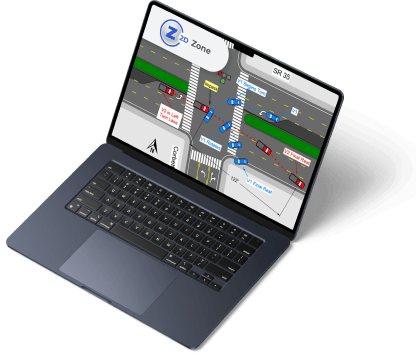
Clear, accurate documentation is vital in public safety. FARO Zone 2D is the industry’s leading diagramming software, replacing the time-consuming task of hand-drawn scene and site diagrams with fast, precise digital results. This dependable and cost-effective solution empowers law enforcement to produce crash report diagrams in just minutes, enables crime scene investigators to capture scenes with exacting accuracy, and supports firefighters in building pre-incident plan diagrams. For large agencies, the FARO Zone 2D Enterprise Version delivers an affordable, scalable, and easy-to-deploy platform for crash reporting and safety planning.
Value of FARO Zone 2D
- Create Fast, Accurate Diagrams
Ribbon menus, keyboard shortcuts, and right-click commands keep every tool within reach. Snap objects together automatically and add dimensions instantly for diagrams that are precise and professional. - Diagram Any Scene With Ease
Step-by-step wizards make it simple to draw roads, walls, stairs, doors, and windows with exact measurements. Choose from thousands of pre-drawn symbols and line-types to illustrate vehicles, weapons, hydrants, furniture, fences, utility shut-offs, and more. - Share and Present
Save hours by sharing crash scene templates across your agency. Insert diagrams into reports as PDFs or present with Zone 2go, combining visuals with photos and notes for a complete record. - Easily Learn and Use
On-screen guidance and tooltips walk you through every function. FARO Assist! provides quick video tutorials for fast onboarding, while FARO Academy offers full-length courses for deeper learning. - Flexible and Compatible
Leverage Google or Bing maps, import and export a wide range of CAD and image formats, and print diagrams at any scale on any paper size your printer supports. - Choose Your Language
FARO Zone 2D is available in English, German, Greek, Italian, French, Spanish, Portuguese, Russian, Polish, Chinese, Korean, and Japanese.
FARO Zone 2D Performance
- The Leading 2D Public Safety Diagramming Software
With FARO Zone 2D, creating detailed and accurate diagrams is fast and straightforward. Begin with a scaled satellite image, add point cloud views from a laser scanner, import total station data, or input manual measurements in baseline or triangulation format. Merge multiple sources seamlessly, even drawings from other CAD tools, for unmatched flexibility. - Exceptional Precision
At its core, FARO Zone 2D is powered by a double-precision floating-point CAD engine, storing every measurement with remarkable accuracy — up to 16 decimal places — ensuring results you can trust.
Features
Below, you will find the main features of the product.
Essential Drawing and Editing Tools
Accurately diagram any scene with precise, easy-to-use drawing tools. Adjust object properties and quickly refine layouts with drag-and-drop editing to change size, rotation, and position—making diagram creation both intuitive and exact.
Flexible Starting Point
Start with a quick sketch or build a highly detailed scene using manual measurements, total station data, satellite imagery, or orthographic projections from a FARO laser scanner. No matter the source, you have the flexibility to work the way you need.
Import Latest DXF/DWG files into Zone
Stay compatible with industry standards by importing the latest ACAD DXF/DWG file formats. FARO Zone supports a wide range of datasets, making it easy to integrate data from other programs and tools into your workflow.
Power Tools
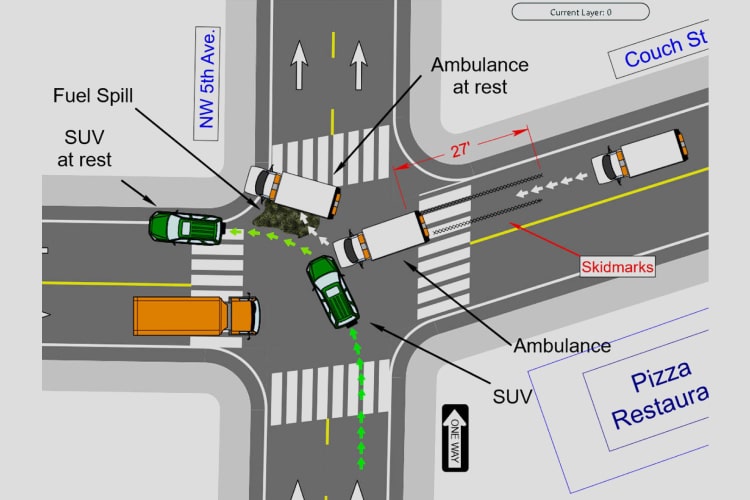
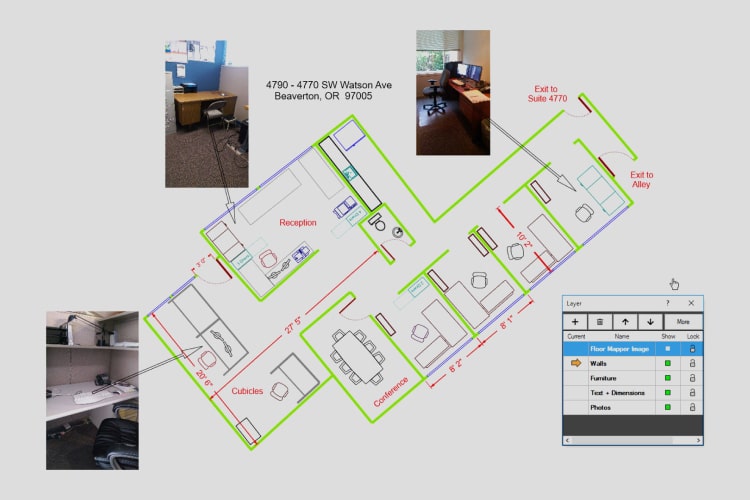
Accelerate common tasks with specialized drawing functions for streets, intersections, stairs, and architectural elements like walls, doors, and windows. These powerful shortcuts save time while ensuring precision in complex diagrams.
Add Photographs and Hyperlinks
Attach photographs and hyperlinks directly to your drawings to create a richer, more detailed project record. Add context, evidence, or reference materials that bring scenes to life and enhance reports or presentations.
AXON Upload/Download
Seamlessly upload and download Zone projects to AXON’s secure cloud storage. Access files anytime, anywhere, and easily share them with colleagues for streamlined collaboration and project management.
Aerial Map Import
Import satellite maps from Google Maps® or Bing® directly into your diagrams. Since they’re true 1:1 scale, you can take precise measurements, outline streets, or trace buildings with confidence, creating accurate, to-scale diagrams quickly.
Pre-drawn Symbols
Choose from thousands of pre-drawn symbols designed for crash, crime, fire, pre-incident, and event diagrams. Quickly find what you need using the search tool, then customize symbols by adjusting size, rotation, and color.
Special Line Types
Transform standard lines, curves, and arcs into specialized line types. With over 40 options—including fences, guardrails, railroad tracks, centerlines, and skid marks—you can add realistic detail and context to any scene.
Satellite Image A.I. Vehicle Detection and Clean-Out
Harness advanced A.I. tools to instantly remove vehicles from Google, Bing, or aerial photos. With just a few clicks, clear away unwanted cars and trucks, creating a clean, unobstructed satellite image of intersections or sites for more accurate scene reconstruction.
Favorites Workflow Toolbar System
Boost productivity with customizable workflow toolbars for symbols, models, and tools. Save frequently used items as favorites for quick access, reuse, and sharing. Tailor toolbars to fit your workflow, ensuring consistency and efficiency—even after long breaks between projects.
Match and Clone
Easily copy properties from one object to another in your drawing. Duplicate styles, dimensions, and formatting in seconds, and streamline repetitive tasks. Build custom legends with your preferred text, line types, and dimensions—saving time by matching instead of resetting.
Automatic Snaps
Work faster and cleaner with automatic snapping that aligns objects, places precise dimensions, and connects corners seamlessly. Eliminate loose ends and ensure diagrams are sharp, consistent, and accurate.
Use Symbol Search Function
Instantly locate the right symbol with the built-in search tool. Once selected, easily resize, rotate, and recolor it to fit your diagram perfectly—streamlining symbol management across any project.
Object Grips
Modify objects on the fly with intuitive grips. Drag to resize, rotate, or reposition elements, giving you hands-on control and flexibility without the need to reconfigure properties.
Applications
Discover the applications in which the product can be used.
Forensic Analysis and Pre-incident Planning
Testimonials
Read what our satisfied customers have to say.
Related Products
See related products from this manufacturer

Get a Quote
You can fill out the contact form below and one of our representatives will contact you shortly.