




FARO Connect® Software
The Ultimate Software for Managing 3D Point Cloud and Image Data
Discover the power of FARO Connect—the ultimate desktop solution for managing 3D point cloud and image data, by FARO, with ease. Powered by GeoSLAM’s proprietary SLAM algorithm, Connect lets you process FARO Orbis data locally, while seamlessly linking to the optional FARO Sphere® XG cloud platform for effortless viewing, sharing, and collaboration. It’s your all-in-one solution for faster, smarter 3D data management.
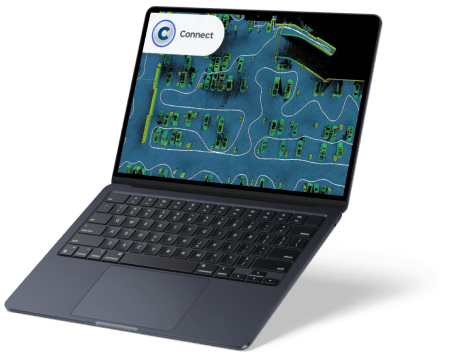
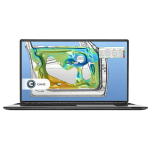
Experience 3D data like never before with the FARO data viewer, bringing your digital replicas to life and allowing you to extract immediate insights from your point clouds. Enhance clarity and precision with automated filters for outliers, noise, thinning, and transient data, and optimize your datasets further with workflows like change detection. Prepare your data for analysis or export with ease, turning raw scans into actionable information.
For mine operators, mobile LiDAR technology paired with GeoSLAM Volumes software makes calculating stockpile tonnages and monitoring changes over time faster and simpler than ever. Mobile laser scanners, such as FARO Orbis, deliver accurate volumes for stockpiles, silo reserves, and mining tempos without relying on GPS. Once processed in FARO Connect, the data can be imported into GeoSLAM Volumes to instantly transform it into actionable 3D information, enabling real-time, confident decision-making.
Operations are streamlined across the supply chain, allowing volumes to be verified as frequently as needed, staff to be trained in minutes, survey times to be slashed, and costs to be reduced. For areas that are difficult or impossible to reach, Elios 3 by Flyability provides survey-grade 3D data from confined spaces. When combined with FARO Connect, Elios 3 data is transformed into precise 3D models, giving teams the ability to monitor, manage, and map previously inaccessible environments with confidence.
Data Processing and Ownership
Local processing in FARO Connect allows users to handle 3D point cloud data up to 50% faster without compromising quality, while maintaining full ownership. For enhanced collaboration, point cloud data can also be uploaded to the Sphere XG Reality Capture platform, enabling seamless teamwork with stakeholders. Flexible processing and storage without third-party ownership ensures secure, transparent cooperation.
Automatic Georeferencing
Use reflective targets or control points to georeference 3D point clouds within FARO Connect. The software automatically detects surveyed reflective targets and positions the point cloud in the real world. Alternatively, placing the scanner on a known control point captures and stores the positional data directly within the 3D point cloud.
Automatic Data Filtering
FARO Connect offers a range of automatic filtering tools to optimize your 3D point cloud data. Outlier removal, surface noise reduction, and transient point elimination improve the accuracy and clarity of the final output, all applied seamlessly within the software.
GeoSLAM Draw
GeoSLAM Draw provides additional capabilities for analyzing mobile LiDAR and static scan data. Easily display large point clouds, take measurements, create CAD geometry, and georeference your data. GeoSLAM Draw comes in configurable industry packages:
- Start Package
- Layout Section: Visualize and create segments of multiple floors and floorplans.
- Sketch: Measure areas, distances, and angles.
- Annotation: Add text annotations to project sections.
- Vectorizer: Automatically vectorize, intersect, merge lines, create curves, and export to .dwg.
- Panorama: View images captured with a 360° camera.
- Cloud Export: Export projects in multiple file formats.
- BIM Package
Includes all Start features, plus:- Web Export: Share interactive HTML or PDF project files.
- Merger: Combine images into a single file for CAD integration.
- Curved, Polygonal & Cylindrical Sections: Visualize rounded or sloped objects.
- RCP Format: Import and export .rcp files.
- Plan Package
Includes Start and BIM features, plus:- Proprietary Formats: Import other file types to contextualize point clouds.
- Registration: Sphere fitting and target selection for advanced project referencing.
- Photo Match: Unfold, measure, and analyze angled or curved objects.
- 4CAD / 4Revit Plugin: Connect with Revit to create CAD models in real time.
- Mining Package
Includes Draw Start, Plan, and BIM features (excluding Photo Match and 4Revit Plugin), plus:- Volume: Measure stockpiles or designated areas and generate calculation protocols.
- Mesh: Extract meshed 3D Digital Terrain Models (DTM).
- Profiler: Vectorize elevation models and view 3D profiles.
- Pro Package
Includes all features from every Draw package, offering maximum flexibility and control over point clouds for advanced workflows.
Features
Below, you will find the main features of the product.
Automatic Point Cloud Colorization
Leverage the integrated camera on FARO Orbis to capture panoramic images and automatically apply RGB colorization to your 3D point clouds. FARO Connect positions the images and colorizes the dataset in a single, streamlined workflow.
A Variety of Export Options
Easily integrate your 3D point cloud data into existing workflows with multiple export formats, including LAZ, LAS, E57, PLY, and TXT, allowing seamless analysis, modeling, and collaboration across platforms.
Link to FARO Sphere XG
Upload your processed data directly to Sphere XG, FARO’s cloud-based platform, for centralized viewing, measurement, and collaboration, giving stakeholders anywhere in the world a unified and up-to-date project perspective.
Register Multiple Point Clouds in FARO SCENE
Import and register Flash Technology™ scans in FARO SCENE to achieve superior global accuracy and interactive registration, giving users control and precision comparable to terrestrial laser scanning.
A User-friendly Interface
Designed for both new and experienced mobile scanning users, FARO Connect offers a clean, intuitive interface that makes navigating and processing point cloud data simple and efficient.
Best-in-class Processing
FARO Connect streamlines the processing of FARO Orbis data, reducing manual intervention with automated workflows that save time while maintaining high-quality results for every project.
Applications
Discover the applications in which the product can be used.
The Perfect Tool for Repeatable data capture and collaboration
Utilize the Versatility of Connect for Better Data
Rapid Site Information for the Modern Mine
Multimedia
Below you will find all available multimedia, including videos & images.
Testimonials
Read what our satisfied customers have to say.
Related Products
See related products from this manufacturer
Get a Quote
You can fill out the contact form below and one of our representatives will contact you shortly.